- Thread starter
- #21


Navigation
Install the app
How to install the app on iOS
Follow along with the video below to see how to install our site as a web app on your home screen.
Note: This feature may not be available in some browsers.
More options
You are using an out of date browser. It may not display this or other websites correctly.
You should upgrade or use an alternative browser.
You should upgrade or use an alternative browser.
What are these seeds or burrs?
- Thread starter CC
- Start date
- Thread starter
- #22
CC
Leafing Out
Okay, have done the 10, but still no idea how to download images to this message. Have them uploaded, but no instructions as to how to do it.

canesisters
Garden Master
It's an old system (there will be an upgrade soon)
To post a picture:
1. go to 'uploads' (tab at the top)
2. click on the 'browse' button to locate the picture on your computer
3. click 'Submit' and wait a moment for the picture to pop up with a message that the upload was successful.
4. right click on the code next to 'image' : { http://blah, blah, blah...} and copy
5. go back to the post you want to place an image and right-click / paste.
[img]http://www.theeasygarden.com/forum/uploads/8721_thcaszvypp.jpg
taa-daa
6. click 'preview' because you want to be sure that you didn't accidently copy something that you'd rather not post on a forum...
and Welcome to TEG!!!
P.S. to preview the new format, go to http://remodelforums.com/ our new one will be very much like this one.
To post a picture:
1. go to 'uploads' (tab at the top)
2. click on the 'browse' button to locate the picture on your computer
3. click 'Submit' and wait a moment for the picture to pop up with a message that the upload was successful.
4. right click on the code next to 'image' : { http://blah, blah, blah...} and copy
5. go back to the post you want to place an image and right-click / paste.
[img]http://www.theeasygarden.com/forum/uploads/8721_thcaszvypp.jpg
taa-daa
6. click 'preview' because you want to be sure that you didn't accidently copy something that you'd rather not post on a forum...
and Welcome to TEG!!!
P.S. to preview the new format, go to http://remodelforums.com/ our new one will be very much like this one.
- Thread starter
- #24
CC
Leafing Out
- Thread starter
- #25
CC
Leafing Out
http://www.theeasygarden.com/forum/uploads/10019_2013-05-280010.jpg[/img
I think I may have finally got it. thanks
I think I may have finally got it. thanks
canesisters
Garden Master
I know... it's confusing and frustrating. Seems that just about everyone goes through this their first few posts.  Hang in there, once you 'get' this you'll find that you LOVE hanging here. The people are wonderful and the conversations (and all their weird twists and turns) are addictive.
Hang in there, once you 'get' this you'll find that you LOVE hanging here. The people are wonderful and the conversations (and all their weird twists and turns) are addictive.- Thread starter
- #27
CC
Leafing Out
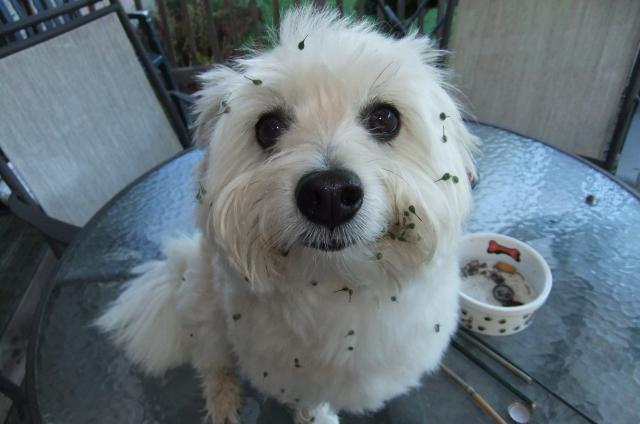
Here is the dog with the messy face.
- Thread starter
- #28
CC
Leafing Out
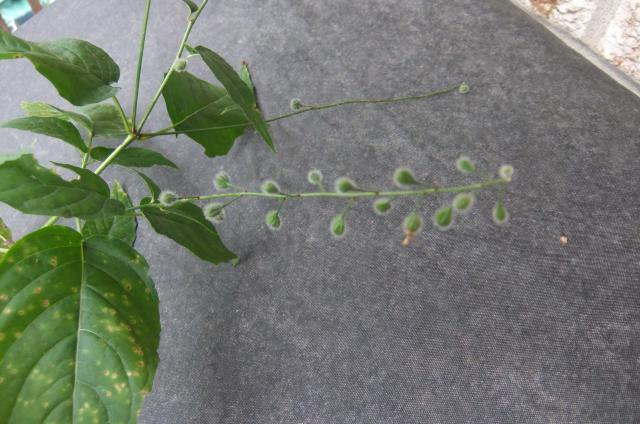
Here is the plant I initially asked about. Have more pics of this doesn't work.
canesisters
Garden Master
OMG LOOK AT THAT FACE!
"Hehe. Look, I got stickers Mom. Hehehe."
Too cute.
I don't know, but I'd be willing to bet that there are seeds inside those clingy little 'shells'. Bet that once they dry, they will open.
"Hehe. Look, I got stickers Mom. Hehehe."
Too cute.
I don't know, but I'd be willing to bet that there are seeds inside those clingy little 'shells'. Bet that once they dry, they will open.

Smart Red
Garden Master
- Joined
- Jan 10, 2012
- Messages
- 11,303
- Reaction score
- 7,409
- Points
- 417
- Location
- South-est, central-est Wisconsin
Congrats, CC! The dog would be a cutie if it hadn't been attacked by small green aliens throwing maces.
You got that first photo. It took me months to get my first one to work. Great job.
Now, get those things off before they get entangled, or you'll be shaving the poor thing. My first dog here in the country was an English Spaniel mix. What a mess he was running through everything wild and burr-y. I swore I'd not have another long-haired dog. My current 'owner' is a chocolate lab from a rescue shelter, named CC. Go figure!
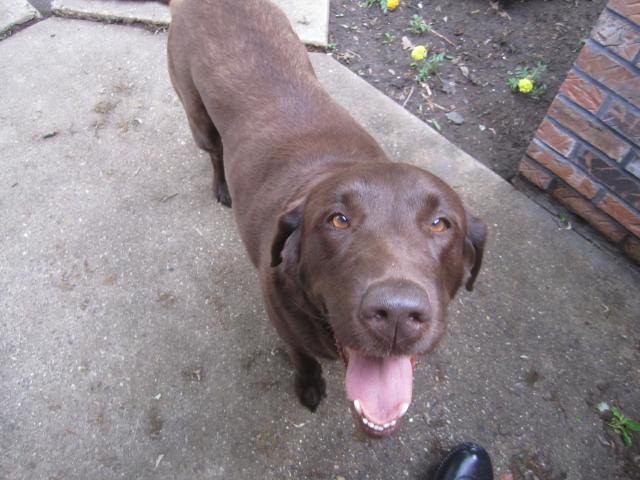
CC is short for Chocolate Chip.
You got that first photo. It took me months to get my first one to work. Great job.
Now, get those things off before they get entangled, or you'll be shaving the poor thing. My first dog here in the country was an English Spaniel mix. What a mess he was running through everything wild and burr-y. I swore I'd not have another long-haired dog. My current 'owner' is a chocolate lab from a rescue shelter, named CC. Go figure!
CC is short for Chocolate Chip.


